3D Coordinate Distance Calculator | XYZ
Visit our menu for more articles and information...
Calculate the distance between multiple points in Cartesian coordinates (X, Y, Z) quickly and accurately with our 3D calculator. Ideal for mathematicians, engineers, students and professionals who need to measure distances in three-dimensional space. Simply enter the number of points, their coordinates and get instant results. Perfect for applications in geometry, physics, 3D modeling and computer graphics. Save time with an intuitive and efficient tool designed to make complex calculations easy.
Have you ever wondered how a GPS knows exactly where you are, or how engineers design complex structures with pinpoint accuracy? The answer lies in a fundamental mathematical concept: coordinates.
Our Distance Calculator is a powerful tool that uses this system to measure the space between multiple points in a three-dimensional environment. But to get the most out of it, it's helpful to understand exactly what those coordinates (X, Y, Z) you're entering are.
What Are Cartesian Coordinates (X, Y, Z)?
Imagine you want to tell a friend the location of a treasure in an empty room. It's not enough to simply tell them "it's over there." You need a reference system.
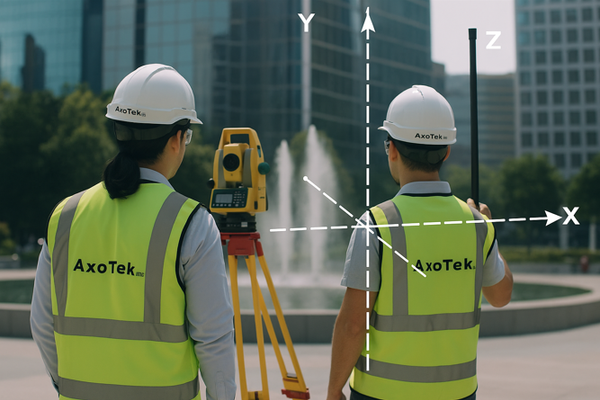
Cartesian coordinates are precisely that: a universal "map" for defining the exact position of any point in space. In a three-dimensional world like ours, this map is made up of three axes:
-
X Axis (Right - Left): Think of this axis as moving horizontally. It's the first number in your coordinate system and tells you how many steps to take to the right (if positive) or to the left (if negative) from a point of origin (point 0).
-
Y Axis (Forward - Backward): This is the second number. Once you've moved along the X axis, the Y axis tells you how many steps to take forward (positive) or backward (negative). With X and Y, you can now locate any point on a plane, just like on a traditional map.
-
Z Axis (Up - Down): This is where we enter the third dimension. The Z axis is the third number and represents height. It tells you how many steps to take up (positive) or down (negative).
By combining these three axes (X, Y, Z), you can describe the precise location of any object in space. For example, the point (4, 5, 3) means: "From the origin, move 4 units to the right, 5 units forward, and 3 units up."
Cartesian vs. Geographic Coordinates: A Key Difference
It's very important to understand that the coordinates (X, Y, Z) used by our calculator are Cartesian. They work perfectly for measuring distances in defined and relatively small spaces, such as a construction site, the design of a mechanical part, or a 3D model. However, these coordinates are not the same as the geographic coordinates (latitude and longitude) used by a GPS.
-
Geographic Coordinates (Latitude, Longitude): These are a spherical coordinate system designed to locate points on the Earth's curved surface. They are measured in degrees, not meters or feet.
-
Cartesian Coordinates (X, Y, Z): These assume a flat space. Trying to use these coordinates to measure large distances on Earth (such as between two cities) would give an incorrect result, as they don't take into account the planet's curvature.
In short: Use our calculator for engineering, surveying, design, or any system where you can establish a local point of origin. Calculating geographic distances based on latitude and longitude requires different, more complex formulas (such as the Haversine formula).
How Does Our Tool Calculate Distance?
When you enter two or more points into our calculator, it applies an extension of the famous Pythagorean Theorem to three-dimensional space.
In school, we learned that for a right triangle, a² + b² = c². Our calculator does something similar, but with three dimensions, to find the straight-line distance (the shortest possible route) between each pair of consecutive points. It then adds these distances together to give you the total length of the route.
The generated 3D graph allows you to visualize this route in space, giving you an intuitive view of the trajectory and the position of your points, especially useful for coordinates obtained from total stations.
The basic formula the calculator uses is to find the straight-line distance between two points in three-dimensional space.
If you have:
-
Point 1 with coordinates (x1,y1,z1)
-
Point 2 with coordinates (x2,y2,z2)
The formula for distance (d) is: